You open a question bank on a laptop after rounds, and the first item is already broken for you. The button labels don't make sense to your screen reader, the timer keeps running, and the explanation video has no captions. If you're a medical student trying to get through USMLE prep, Shelf review, or a recorded lecture after a long day, that kind of friction doesn't feel like a minor inconvenience. It feels like the course is telling you that the material is there, but not really for you.
That's why online learning accessibility in medical education can't be reduced to captions and alt text alone. The core issue is whether the learner, the platform, and the home environment all work together enough to let a student participate, study, and show what they know. UNESCO's pandemic-era data made that gap impossible to ignore, because distance learning could potentially reach more than 1 billion students but still missed at least 500 million students, or 31% of learners worldwide, and the gap was even larger for the poorest students, 72% of whom were not reached (UNESCO GEM Report 2023).
When a Medical Student Hits an Accessibility Wall
A student with low vision opens a timed pathology block and tries to move through the interface with the keyboard. The focus disappears, one answer option won't read correctly, and the image prompt is a scanned figure that the screen reader can't parse. On the other side of the screen, a deaf student watches a pharmacology lecture replay and realizes the key explanation sits in spoken audio that never got captions or a transcript.
Those are not edge cases in medical education. They're the point where a learner's ability to study intersects with the design of the course, the test platform, and the student's own environment. A well-built lesson can still fail if the video player, the quiz tool, or the PDF export shuts out the learner at the exact moment they need access most.
The scale of the problem got clearer during the COVID period, when UNESCO reported that only 40% of primary schools, 50% of lower secondary schools, and 65% of upper secondary schools were connected to the internet globally, which shows how much online education depends on basic connectivity, not just content delivery (UNESCO GEM Report 2023). In U.S. higher education, the shift was already mainstream by fall 2021, when 9.4 million undergraduate students, about 61% of all undergraduates, were enrolled in at least one distance education course, and 4.4 million were studying exclusively online (NCES Fast Facts).
Practical rule: if a medical learner can't read the question, hear the lecture, or move through the interface without a mouse, the platform is functionally closed, no matter how strong the content looks on paper.
That's why tutors, course teams, and exam-prep platforms need a broader model. Legal rules matter, technical standards matter, and accommodation paperwork matters. So do device access, study space, bandwidth, and the way disability shows up differently for students in different homes and health contexts.
What Online Learning Accessibility Means
A medical student opens a quiz at night, only to find that the lecture notes are locked inside a scanned PDF, the video has no captions, and the answer choices can only be selected with a mouse. The content may be strong. The access path is not. That gap is what online learning accessibility addresses.
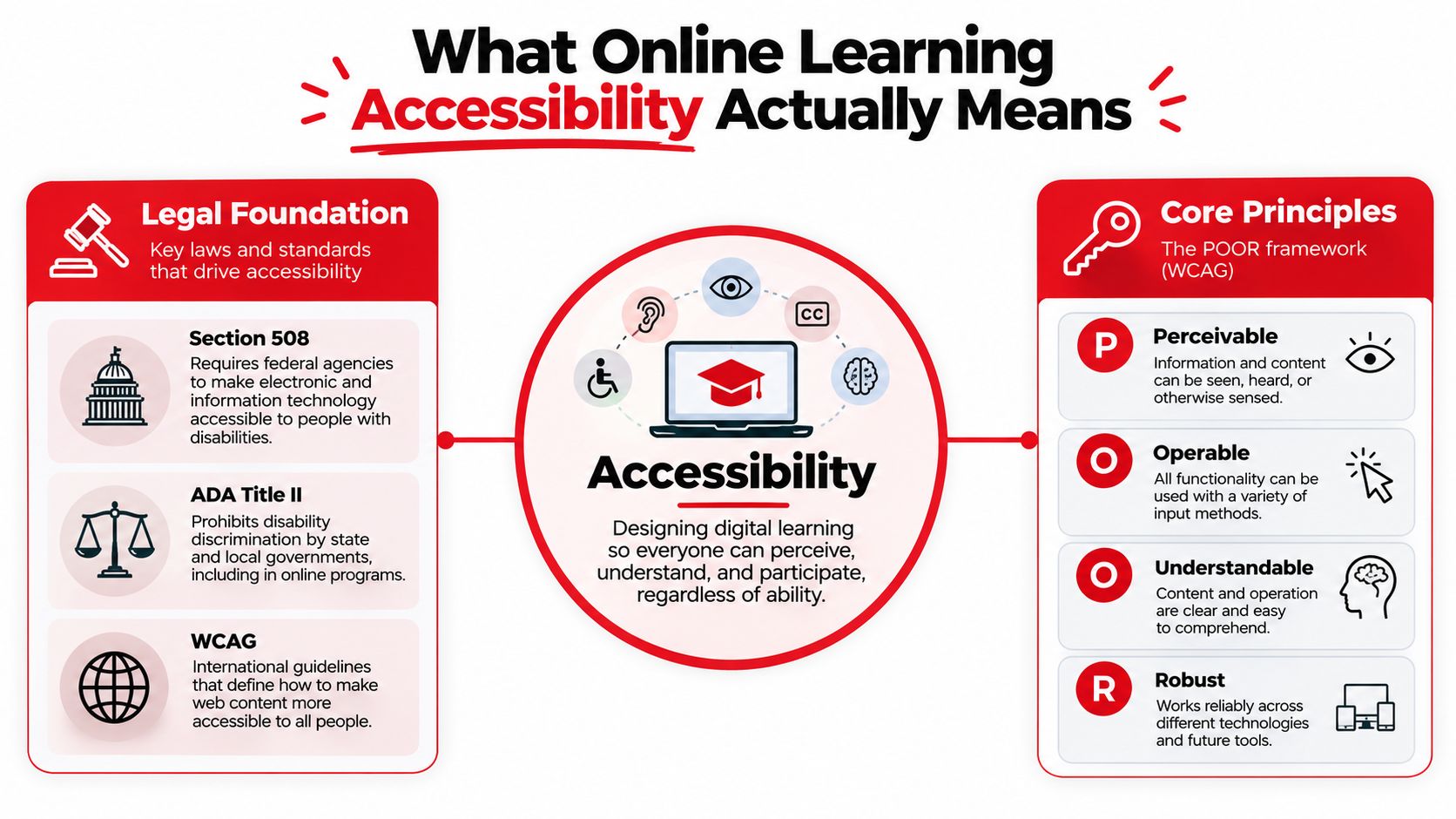
Online learning accessibility means designing digital learning so people can perceive, understand, and participate regardless of ability. In practice, that means a student should be able to enter the course, understand the material, move through the interface, and complete the task without being blocked by avoidable design choices.
The technical baseline many teams use is WCAG, which sits underneath many accessibility policies and procurement standards. In the U.S., the ADA provides the civil-rights backbone, while Section 504 shapes accommodation expectations in education settings. In Europe and many procurement settings, EN 301 549 plays a similar role for digital accessibility expectations. The point is simple, standards tell you what the floor is, but they do not automatically tell you whether the experience is usable for a student trying to pass a test at 11 p.m.
A building entrance illustrates the point. A wheelchair ramp may satisfy the requirement to get in, but the building still is not accessible if the doors are too heavy, the signs cannot be read, or the elevator buttons cannot be reached. Online learning works the same way. A platform might technically offer one accessible feature, but still fail if the PDF is scanned as an image, the quiz only works with a mouse, or the video player traps keyboard focus.
For a quick framework, the POUR principles still help tutors and platform teams remember the basics, Perceivable, Operable, Understandable, and Strong. Those terms are simple enough to remember and specific enough to audit against. They also pair well with a broader teaching mindset, like the approach in supporting SEMH students online, because accessibility and learning support often overlap in the same student experience.
A flexible course structure matters too. A recorded lecture with a transcript, a downloadable reading, and a discussion board gives students more than one route into the material. That matters in medical study, where fatigue, shift work, and clinical obligations can collide. One useful way to build that flexibility is through asynchronous learning advantages, where pacing and access are treated as part of the learning design rather than an afterthought.
The key point for medical education is blunt. If access breaks, a learner may not just miss a lesson, they may miss the pathway into the profession.
Common Barriers in Medical E-Learning
Medical students usually don't run into one big accessibility problem. They hit several smaller ones in sequence, and each one cuts off another part of the lesson.
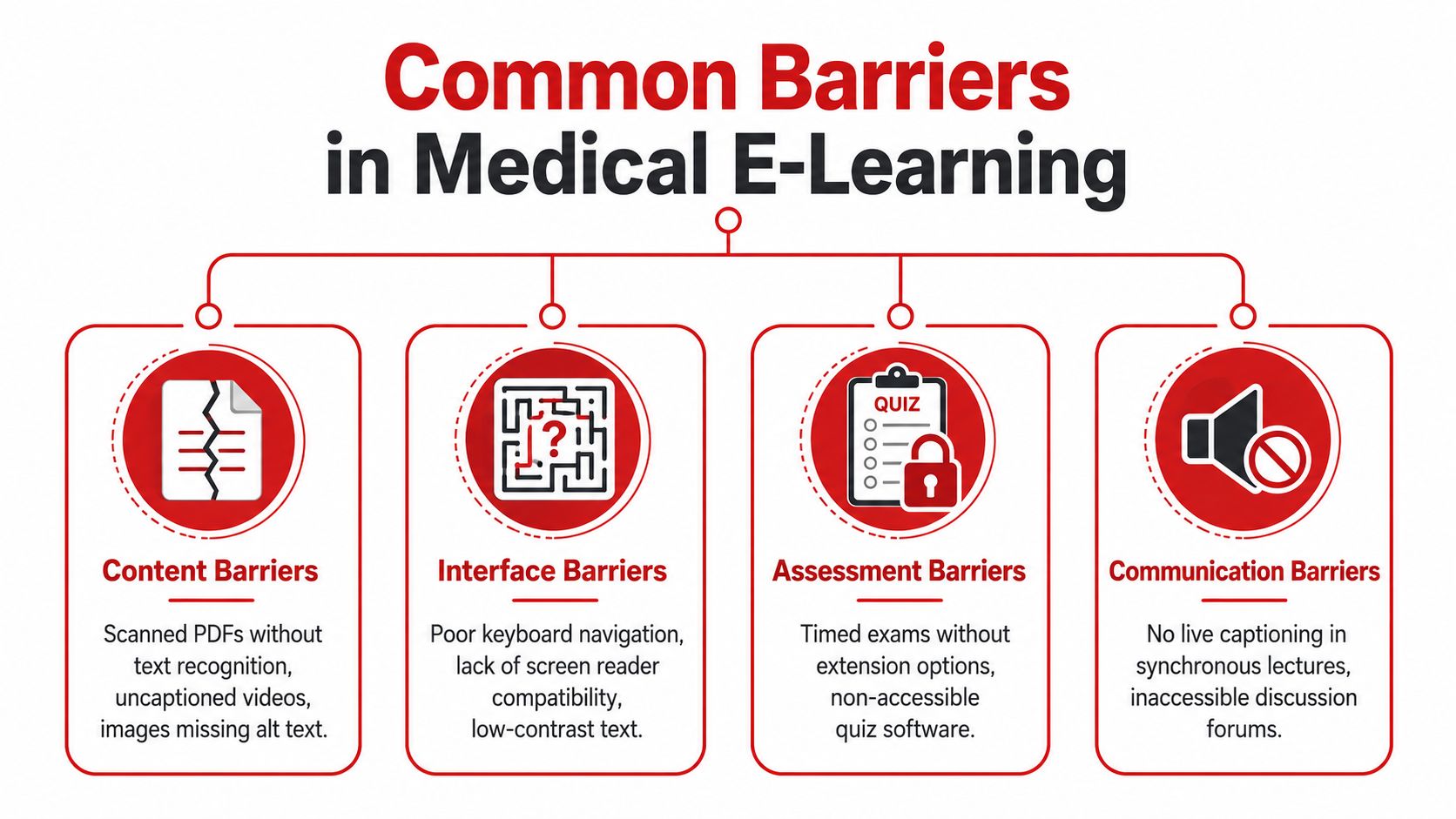
| Barrier type | What it looks like in med ed | Why it blocks learning |
|---|---|---|
| Content barriers | Scanned PDFs, uncaptioned lecture clips, histology images with no alt text | Screen readers can't reliably interpret the material |
| Interface barriers | Mouse-only question banks, low-contrast text, drag-and-drop items that won't work with the keyboard | The learner can't navigate or submit answers |
| Assessment barriers | Timed quizzes, screen-locked proctoring, inaccessible case simulations | The test measures software tolerance as much as knowledge |
| Environmental barriers | Unreliable internet, no quiet space, no device of their own | Even accessible content becomes unusable in real life |
A scanned anatomy handout is a good example of a content barrier. If the file is just a series of images, the learner can't search it, annotate it, or have it read aloud by a screen reader. An uncaptioned pathology walkthrough has the same effect for a deaf student, even if the visuals are excellent. In clinical subjects, the problem often hides behind “high-yield” formatting, but a well-designed resource still needs real text, captions, transcripts, and a logical reading order.
Interface barriers show up in the places students use most often. A question bank that requires dragging labels into a diagram can fail for keyboard-only users. Low-contrast answer choices can be hard to read for students with low vision or on a dim laptop screen during call shifts. A platform that doesn't preserve focus order can make a student feel like the page is fighting back, which is exactly what an input/output mismatch looks like.
Assessment barriers are harder because they mix pedagogy with gatekeeping. A timed block that ignores processing differences, motor limitations, or the need for assistive technology can turn an evaluation into an access test. The same is true for remote proctoring tools that lock down the browser in ways that interfere with screen readers or magnification software. Those systems can be described as secure, but security and accessibility aren't the same thing.
Medical-education reality: if a learner needs a keyboard, a caption file, or extra time to show knowledge, that's not a bonus feature. It's part of whether the assessment is measuring the right thing.
The last barrier is the one most guides underplay, the learner's environment. Poor connectivity, no dedicated device, and a noisy home can undo the gains of an otherwise accessible platform. For medical students who are already balancing rotations, family obligations, and sleep debt, that environmental pressure is not background noise. It's the actual setting in which learning happens. The practical implications of secure and usable learning environments also connect with data privacy for students, because trust, access, and platform design travel together.
For a short visual way to keep these categories in mind, think in terms of whether the learner can receive, process, answer, and persist. If any one of those steps fails, the resource fails with it. One recent review of online-education inaccessibility even clustered barriers across home study conditions, digital literacies, institutional support and monitoring, uneven assessment conditions, spatial-digital inequities, disabilities, and intersecting structural inequalities, which is exactly why the problem is bigger than a single missing caption (Taylor & Francis, 2025).
Practical Fixes for Tutors and Platforms
A tutor does not need to rebuild an entire LMS to make access better this week. Small changes matter when they are applied consistently, especially in a medical curriculum where learners move between lecture clips, case PDFs, and timed question sets all day.
Start with the materials people touch most
Recorded lectures should include closed captions and a downloadable transcript. A student reviewing biochemistry at midnight should not have to choose between hearing the content and understanding it. For PDFs, use selectable text, tagged headings, logical reading order, and searchable files instead of image-only exports. A pathology handout that only exists as a scan creates an access problem before anyone opens the quiz.
For figures, write alt text that tells the learner what matters, not just what appears. A histology slide needs more than “image of tissue.” It needs the finding, label, or comparison the student is supposed to learn. When the graphic is complex, add a brief written description in the body text so the image does not carry the whole lesson alone.
Make the interface work for keyboard and assistive tech users
Question banks and review platforms should work without a mouse. That means visible focus states, keyboard navigation, logical tab order, and no surprise pop-ups that trap the learner. Screen-reader compatibility matters here because a page can look polished and still be hard to use if form fields, buttons, and answer feedback are not exposed correctly to assistive software.
Helpful habit: before you publish a question set, tab through it from start to finish. If you lose your place, the learner probably will too.
Color contrast also needs attention. Do not let color alone carry meaning, especially in diagrams, answer explanations, or progress trackers. A medical student on a crowded train or in a dark call room should not have to squint to decode whether a response was correct.
Build in flexible teaching choices
Live sessions should allow captioning and spoken or typed questions. Pre-class outlines help students know what to listen for, and multiple modalities help when one format does not land. In medical education, that can mean pairing a verbal explanation of a cardiac murmur with a labeled diagram and a short written summary, so no learner has to rely on a single channel.
Accessible online review tools are easier to maintain when they center readable formatting, captioning, and clear page structure. That same logic applies across the content, metadata, and delivery layers. It is the same idea behind ISO/IEC 24751 and IMS Access for All, which separate the learning object from the learner profile and assume that content should match the learner's needs and preferences.
Hardware and hearing support matter too. A student using assistive listening tools may need a different setup than a classmate, and hearing aid options in Boca Raton can be part of a broader support plan when listening access is a barrier. The point is not the brand. It is making sure the learning environment does not assume every learner can hear, see, and respond in the same way.
Accommodations for High-Stakes Exams and Clinical Learning
Medical students usually meet accessibility most sharply at the point of assessment. That's where tutoring, disability services, and test administrators need to work together, because a good accommodation process protects both the student and the validity of the exam.
The request has to start early
Students usually need to work through the school's disability office or testing accommodation service, gather documentation, and submit the request well ahead of the exam date. That timing matters because high-stakes exams such as NBME subject tests, USMLE Step 1, Step 2, and Step 3, COMLEX levels, and OSCE-style assessments often involve separate review steps and testing logistics. Private tutors shouldn't promise outcomes on accommodations, but they can help students organize paperwork, prepare language for the request, and map out the timeline.
The accommodation should match the barrier
Common accommodations include extended time, separate rooms, breaks, and support for screen readers or zoom-text use when the testing environment allows it. In contrast, some clinical settings are harder to adapt, especially where an assessment depends on in-person interaction, live observation, or standardized patient workflows. A remote version of an OSCE may not be the right solution, even if the student needs changes in how they access the station.
The important distinction is between access to the knowledge and access to the format. A student who knows the material still needs a fair way to demonstrate it. That's the reason accommodation paperwork exists in the first place.
Tutoring can help without overstepping
A tutor can make the process smoother by keeping a simple checklist:
- Document the barrier early. Ask what part of the current study or testing setup is failing.
- Save course examples. Keep screenshots or notes showing inaccessible PDFs, videos, or quiz tools.
- Match prep to the accommodation. Practice with the tools the student will use.
- Coordinate with the school office. Don't assume the tutor can approve anything directly.
- Avoid hidden assumptions. Don't build practice sessions around speed alone or one sensory channel only.
For students who need help translating study habits into accommodation-ready preparation, one-on-one tutoring benefits often come from individual pacing and direct feedback, especially when the learner also has to manage documentation and testing logistics. That support works best when the tutor treats accommodation planning as part of exam preparation, not a side task.
The Intersectional Access Problem Most Guides Miss
A lot of accessibility advice stops at compliance. That's too narrow for medical education, and it misses the students most likely to be left out. A platform can satisfy a checklist and still be unusable for a learner who has weak internet, no quiet room, limited digital literacy, and a disability that affects reading, hearing, or motor control.
That's the intersectional problem. A recent review of online-education inaccessibility grouped barriers across home study conditions, digital literacies, institutional support and monitoring, uneven assessment conditions, spatial-digital inequities, disabilities, and intersecting structural inequalities (Taylor & Francis, 2025). For students in the global South or in low-income contexts, those barriers stack rather than appear one at a time. A learner can have captions and still lose access because the connection drops during a live review session, or because there's no device available for the evening study block.
That's why “just add captions” is not a serious accessibility strategy. It helps, but it doesn't solve the full problem. If the student can't download the material, can't hear the session, can't find a quiet place to study, or can't get institutional support quickly enough, the platform remains exclusionary even when it meets a narrow definition of compliance.
Practical responses have to match the stack of barriers. Device-loan programs help when ownership is the issue. Offline-capable content helps when bandwidth is unstable. Low-bandwidth video options help when live streaming is unrealistic. Multilingual captions matter when language and disability intersect. Outreach to disability services matters when students don't know what support exists or how to ask for it. The more complex the learner's environment, the more the system has to anticipate use outside ideal conditions.
For a useful way to think about this in health professions education, cultural competency in healthcare offers a parallel. In both cases, you're not designing for an abstract average learner, you're designing for real people whose circumstances shape what access means.
Running an Accessibility Audit and Finding Training
A small audit can uncover more than a long policy document. Start with the tools your students already use most, then check whether those tools behave the way they should.
| Audit step | What to look for | Simple fix |
|---|---|---|
| Keyboard-only test | Can you tab through everything in order? | Add visible focus states and fix tab order |
| Screen-reader smoke test | Are buttons, headings, and labels announced correctly? | Tag elements properly and rename controls |
| Color-contrast pass | Can text be read without strain? | Adjust colors and don't rely on color alone |
| Caption and transcript check | Does every recording have both? | Export captions and post a transcript |
| Alt-text review | Does each figure convey the learning point? | Rewrite alt text to include the lesson purpose |
| Form-label review | Do fields say what they're for? | Add explicit labels and error messages |
| Timed component review | Does time pressure match the learning goal? | Add flexibility or an accommodation path |
For training, the most useful resources are the ones mapped to the job. WAI's WCAG quick reference is for teams that need the standards in a readable format. AFB guidance is helpful when blind or low-vision access is the immediate concern. UDL and HEAG-style frameworks are better when a program wants to redesign teaching habits, not just patch broken pages. Educators who need institution-level support should look for professional development that covers both content creation and accessibility testing, because the fix is rarely only technical.
If you want a good rule for where to begin, audit the most-used resource first, then the most fragile one. In med ed, those are usually the lecture videos and the question bank. If both of those are usable, a lot of the rest gets easier.
Putting It All Together for Medical Learners
Accessibility in medical education is not a checkbox you finish once. It's a layered decision that starts with legal compliance, moves through platform design, includes teaching practice, and ends with the learner's actual environment. If any layer fails, the student feels it immediately, usually at the exact moment they're trying to learn something hard.
This week, three moves will make the biggest difference. If you're a student, gather the examples that show where access is breaking and start the accommodation process early. If you're a tutor, check your lecture files, question banks, and PDFs for captions, keyboard access, and readable structure. If you run a platform, test it with a screen reader and a keyboard before you ask students to trust it.
Medical education is only getting more digital. The providers who treat accessibility as core infrastructure, not compliance theater, will serve more learners and build more durable programs. The ones that don't will keep losing students at the exact point where support should have been easiest to provide.
If you want board prep that respects how medical students study, Ace Med Boards offers one-on-one tutoring for USMLE, COMLEX, and Shelf exams with flexible online support. If accessibility has been getting in the way of your progress, their format can fit into a plan built around clearer pacing, targeted review, and exam-specific strategy.